> ## Documentation Index
> Fetch the complete documentation index at: https://botcadence-a5dbc408.mintlify.site/llms.txt
> Use this file to discover all available pages before exploring further.
# Team Member Management
> Learn how to manage team members and permissions within your organization.
Collaborating with your team is essential for building and maintaining effective chat agents. Botcadence provides robust tools for managing invitations and roles.
## Inviting Team Members
To collaborate with others, you can invite them to join your organization directly from the Dashboard.
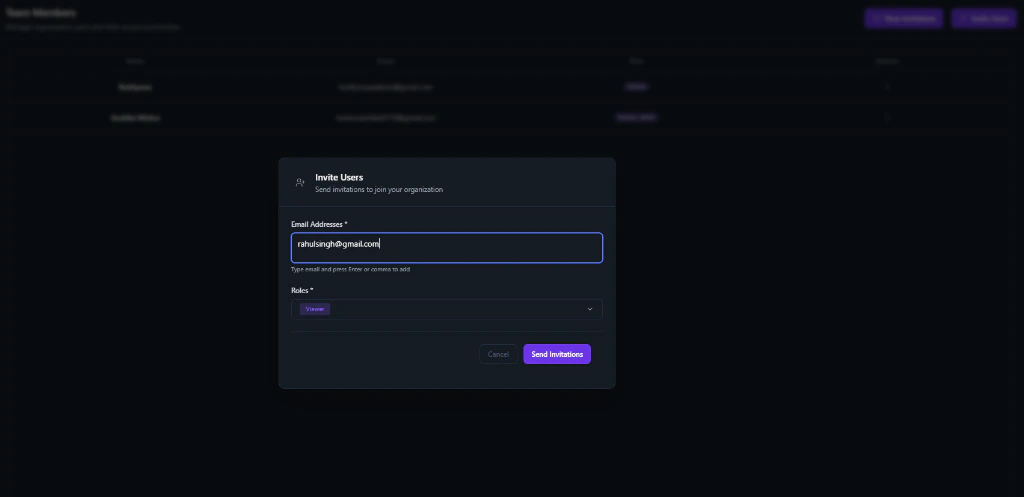 1. Navigate to the **Team Members** page.
2. Click on the **New Invitation** button (top right).
3. In the **Invite Users** modal that appears, enter the email address(es) you wish to invite.
4. Select a **Role** (e.g., Viewer, Member, Admin) from the dropdown.
5. Click **Send Invitations** to trigger the email invite.
## Managing Existing Members
From the **Team Members** page, you can:
* **View Active Users**: See a list of all current members and their status.
* **Update Roles**: Change permissions for existing members at any time.
* **Remove Members**: Revoke access for users who no longer need it.
## Role-Based Access Control
Permissions are managed at the organization level to ensure security:
| Role | Permissions |
| :--------- | :------------------------------------------------------------------------------ |
| **Owner** | Full administrative control, including billing and organization deletion. |
| **Admin** | Can manage projects, invites, and settings, but cannot delete the organization. |
| **Member** | Can create and manage projects within the organization. |
| **Viewer** | Read-only access to projects and data. |
## Safety and Guardrails
The Botcadence Dashboard is a **guarded project**:
* **Strict Access Control**: You can only access data belonging to organizations you are a member of.
* **Automatic Redirection**: If you attempt to access a resource with an invalid organization ID, the system will automatically redirect you to your last active organization.
* **Leaving Organizations**: You can leave any organization you were invited to, but the creator (Owner) must always maintain the organization or delete it entirely.
We recommend assigning minimal permissions necessary (principle of least privilege) when inviting new members to ensure your organization's security.
1. Navigate to the **Team Members** page.
2. Click on the **New Invitation** button (top right).
3. In the **Invite Users** modal that appears, enter the email address(es) you wish to invite.
4. Select a **Role** (e.g., Viewer, Member, Admin) from the dropdown.
5. Click **Send Invitations** to trigger the email invite.
## Managing Existing Members
From the **Team Members** page, you can:
* **View Active Users**: See a list of all current members and their status.
* **Update Roles**: Change permissions for existing members at any time.
* **Remove Members**: Revoke access for users who no longer need it.
## Role-Based Access Control
Permissions are managed at the organization level to ensure security:
| Role | Permissions |
| :--------- | :------------------------------------------------------------------------------ |
| **Owner** | Full administrative control, including billing and organization deletion. |
| **Admin** | Can manage projects, invites, and settings, but cannot delete the organization. |
| **Member** | Can create and manage projects within the organization. |
| **Viewer** | Read-only access to projects and data. |
## Safety and Guardrails
The Botcadence Dashboard is a **guarded project**:
* **Strict Access Control**: You can only access data belonging to organizations you are a member of.
* **Automatic Redirection**: If you attempt to access a resource with an invalid organization ID, the system will automatically redirect you to your last active organization.
* **Leaving Organizations**: You can leave any organization you were invited to, but the creator (Owner) must always maintain the organization or delete it entirely.
We recommend assigning minimal permissions necessary (principle of least privilege) when inviting new members to ensure your organization's security.