> ## Documentation Index
> Fetch the complete documentation index at: https://botcadence-a5dbc408.mintlify.site/llms.txt
> Use this file to discover all available pages before exploring further.
# Human Handovers
> Seamlessly transition conversations from AI to human agents when specialized assistance is needed.
Human Handover allows your team to take control of a conversation when the AI agent identifies a complex query or when a user specifically requests human assistance. This ensures that your customers always receive the highest level of support.
## Enabling Human Handover
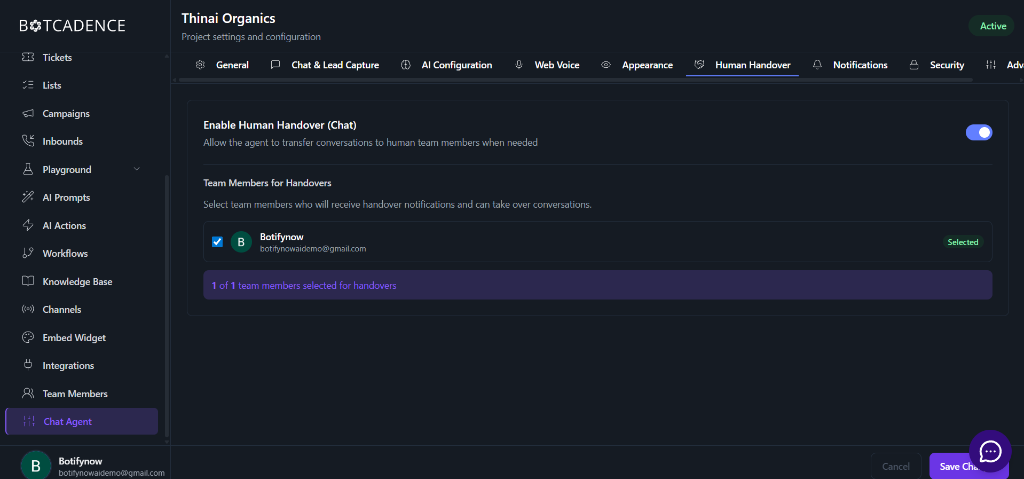
To start using human handovers, you first need to enable the feature and designate team members who will handle these requests.
Go to **Chat Agent** in the left sidebar and select the **Human Handover** tab.
Toggle the **Enable Human Handover (Chat)** switch to the ON position.
Choose the team members who should receive handover notifications. Only selected members will be able to see and take over conversations from the handover queue.
Click the **Save Changes** button at the bottom right to apply your settings.
 ## Managing Handovers
Once enabled, you can monitor and participate in conversations requiring human intervention.
### Viewing Active Handovers
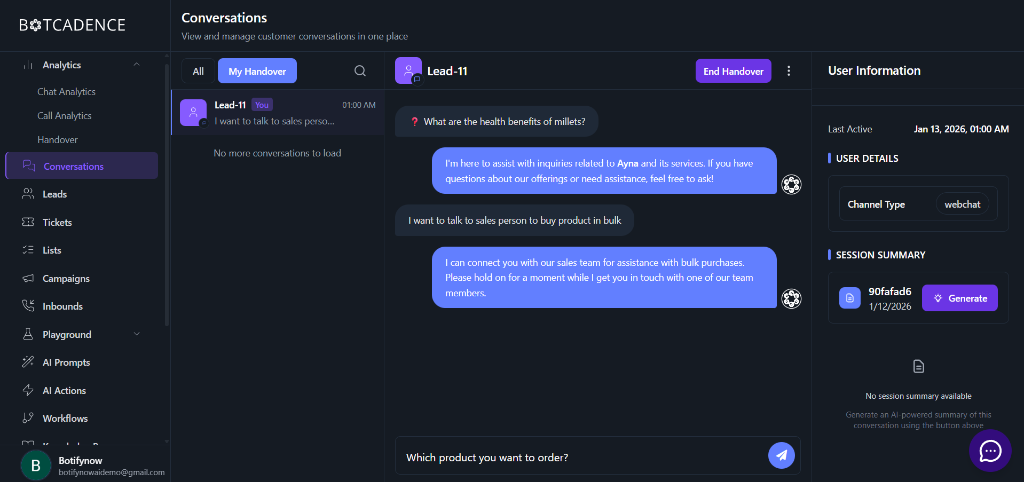
All conversations that have been handed over to humans can be found in the **Conversations** section.
1. Navigate to **Conversations** in the left sidebar.
2. Click on the **My Handover** tab. This will filter the list to show only the conversations assigned to you or waiting for a human agent.
## Managing Handovers
Once enabled, you can monitor and participate in conversations requiring human intervention.
### Viewing Active Handovers
All conversations that have been handed over to humans can be found in the **Conversations** section.
1. Navigate to **Conversations** in the left sidebar.
2. Click on the **My Handover** tab. This will filter the list to show only the conversations assigned to you or waiting for a human agent.
 ### Taking Over a Conversation
When you select a conversation from the **My Handover** list:
* The AI agent stops responding to that specific user automatically.
* You can type your messages in the chat box at the bottom and click the **Send** icon.
* The user will receive your messages directly, allowing for a personalized support experience.
### Ending a Handover
Once the user's query has been resolved, you should close the handover session to allow the AI to take back control or to mark the session as completed.
* Click the **End Handover** button located at the top right of the conversation window.
* This will return the conversation to the AI agent (if configured) or simply close the active human intervention.
Before ending a handover, check the **Session Summary** on the right sidebar to ensure all user concerns have been addressed.
## Handover Analytics
Monitor your team's performance and understand how often human intervention is required through the Handover Analytics dashboard.
Navigate to **Analytics** > **Handover** to view detailed metrics:
* **Total Handovers:** Total number of times a human took over a conversation.
* **Pending:** Handovers currently waiting for an agent to respond.
* **In Progress:** Conversations currently being handled by human agents.
* **Completed:** Successfully resolved handover sessions.
* **Agent Performance:** A breakdown of how each team member is performing, including resolution times and customer ratings.
### Taking Over a Conversation
When you select a conversation from the **My Handover** list:
* The AI agent stops responding to that specific user automatically.
* You can type your messages in the chat box at the bottom and click the **Send** icon.
* The user will receive your messages directly, allowing for a personalized support experience.
### Ending a Handover
Once the user's query has been resolved, you should close the handover session to allow the AI to take back control or to mark the session as completed.
* Click the **End Handover** button located at the top right of the conversation window.
* This will return the conversation to the AI agent (if configured) or simply close the active human intervention.
Before ending a handover, check the **Session Summary** on the right sidebar to ensure all user concerns have been addressed.
## Handover Analytics
Monitor your team's performance and understand how often human intervention is required through the Handover Analytics dashboard.
Navigate to **Analytics** > **Handover** to view detailed metrics:
* **Total Handovers:** Total number of times a human took over a conversation.
* **Pending:** Handovers currently waiting for an agent to respond.
* **In Progress:** Conversations currently being handled by human agents.
* **Completed:** Successfully resolved handover sessions.
* **Agent Performance:** A breakdown of how each team member is performing, including resolution times and customer ratings.
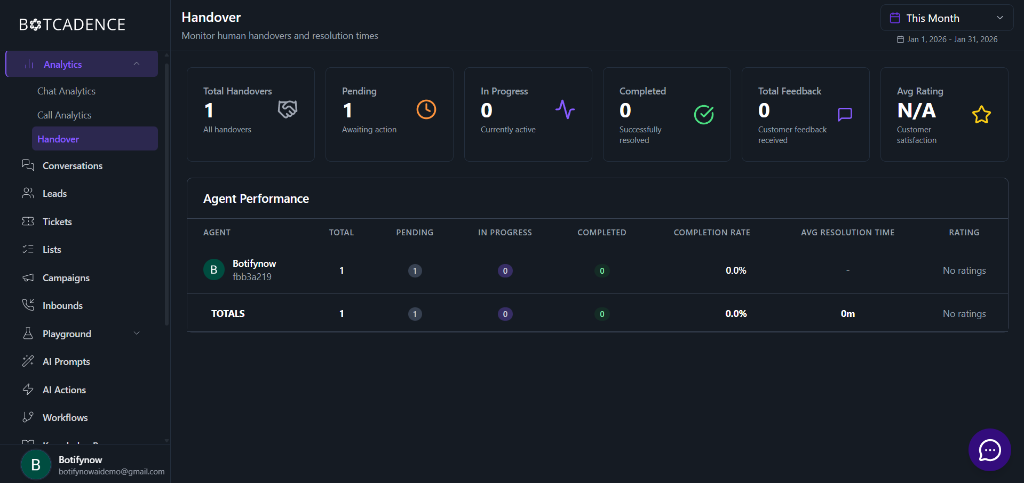 Regularly reviewing handover analytics helps you identify common "bottlenecks" where the AI might need better training or revised prompts.