> ## Documentation Index
> Fetch the complete documentation index at: https://botcadence-a5dbc408.mintlify.site/llms.txt
> Use this file to discover all available pages before exploring further.
# Conversations
> Manage conversations, view intelligent summaries, and monitor real-time interactions.
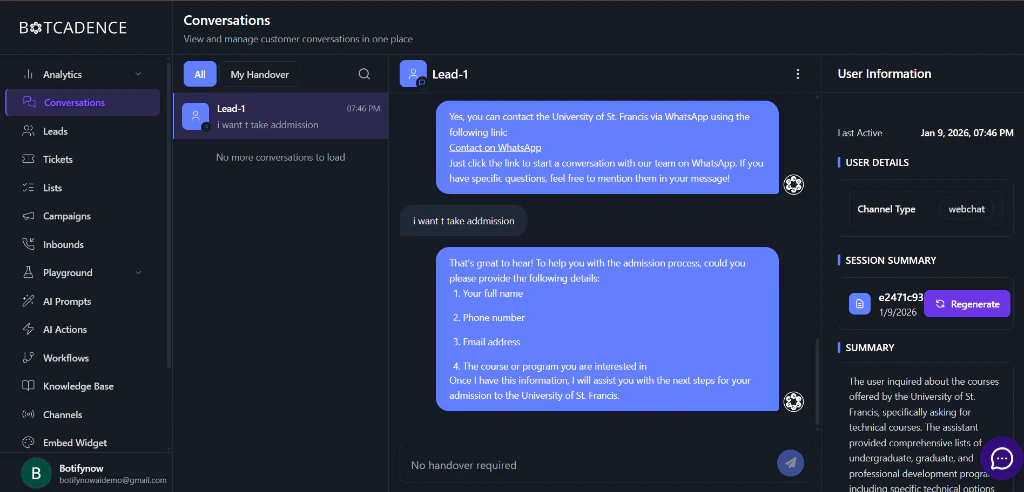
The Conversations page is your central hub for monitoring and managing all interactions between your AI agents and your customers. It provides real-time visibility into active chats, automated summaries, and detailed lead data.
 ## Key Features
The Conversations interface is divided into three main sections to help you efficiently manage your customer relations.
### 1. Conversation History
On the left sidebar, you can find a chronological list of all conversations.
* **Real-time Updates:** New messages and conversations appear instantly.
* **Search & Filter:** Quickly find specific conversations or leads.
* **Handover Status:** See which conversations require human intervention or have been successfully handled by the AI.
### 2. Active Chat Interface
The central panel displays the full dialogue between your AI agent and the user.
* **Full Context:** View the entire message history to understand the user's journey.
* **Live Monitoring:** Watch as your AI agent responds to user inquiries in real-time.
* **Manual Intervention:** If needed, you can take over the conversation to provide a personal touch.
### 3. Lead & Session Intelligence
The right sidebar provides deep insights into the user and the specific interaction.
#### User Information
Get a snapshot of who your user is and how they are interacting with you:
* **Last Active:** Track when the user was last online.
* **Channel Type:** Identify which platform the user is coming from (e.g., Webchat, WhatsApp, Slack).
* **User Details:** Any captured information like name, email, or phone number.
#### Session Summary
Botcadence automatically generates a concise summary of the current session. This allows your team to understand the core of the interaction at a glance without reading through the entire chat log.
* **Auto-Generation:** Summaries are updated as the conversation progresses.
* **Regenerate:** Use the **Regenerate** button to refresh the summary based on the latest messages.
#### Conversation Summary
A more detailed breakdown that analyzes:
* **User Intent:** What the user was specifically looking for.
* **Agent Performance:** How well the agent addressed the user's needs.
* **Extracted Info:** Key data points extracted during the conversation (e.g., specific products of interest, intent to purchase).
## Managing Leads
Every conversation is automatically associated with a **Lead**. As users interact with your agent, Botcadence builds a profile for them, making it easy to track their progress through your sales or support funnel.
Use the **Summary** section to quickly prep for a manual handover. It saves your human agents minutes of reading time!
## Key Features
The Conversations interface is divided into three main sections to help you efficiently manage your customer relations.
### 1. Conversation History
On the left sidebar, you can find a chronological list of all conversations.
* **Real-time Updates:** New messages and conversations appear instantly.
* **Search & Filter:** Quickly find specific conversations or leads.
* **Handover Status:** See which conversations require human intervention or have been successfully handled by the AI.
### 2. Active Chat Interface
The central panel displays the full dialogue between your AI agent and the user.
* **Full Context:** View the entire message history to understand the user's journey.
* **Live Monitoring:** Watch as your AI agent responds to user inquiries in real-time.
* **Manual Intervention:** If needed, you can take over the conversation to provide a personal touch.
### 3. Lead & Session Intelligence
The right sidebar provides deep insights into the user and the specific interaction.
#### User Information
Get a snapshot of who your user is and how they are interacting with you:
* **Last Active:** Track when the user was last online.
* **Channel Type:** Identify which platform the user is coming from (e.g., Webchat, WhatsApp, Slack).
* **User Details:** Any captured information like name, email, or phone number.
#### Session Summary
Botcadence automatically generates a concise summary of the current session. This allows your team to understand the core of the interaction at a glance without reading through the entire chat log.
* **Auto-Generation:** Summaries are updated as the conversation progresses.
* **Regenerate:** Use the **Regenerate** button to refresh the summary based on the latest messages.
#### Conversation Summary
A more detailed breakdown that analyzes:
* **User Intent:** What the user was specifically looking for.
* **Agent Performance:** How well the agent addressed the user's needs.
* **Extracted Info:** Key data points extracted during the conversation (e.g., specific products of interest, intent to purchase).
## Managing Leads
Every conversation is automatically associated with a **Lead**. As users interact with your agent, Botcadence builds a profile for them, making it easy to track their progress through your sales or support funnel.
Use the **Summary** section to quickly prep for a manual handover. It saves your human agents minutes of reading time!